
This documentation is currently under development and subject to change. It reflects outcomes elaborated by 5G-MAG members. If you are interested in becoming a member of the 5G-MAG and actively participating in shaping this work, please contact the Project Office
CAMARA: Connectivity Insights API
Description
The “Connectivity Insights” API gives developers visibility into network quality, allowing them to check if their application’s network requirements can be met for a given user session. Based on the API’s response, developers can make informed decisions – like requesting a network boost through CAMARA Quality on Demand API or adjusting application settings (e.g., video resolution) to ensure the best possible user experience.
Information: https://camaraproject.org/connectivity-insights/ and https://github.com/camaraproject/ConnectivityInsights
The API definitions can be obtained here: https://github.com/camaraproject/ConnectivityInsights/tree/main/code/API_definitions
Relation of APIs
Connectivity Insights API
- POST /check-network-quality with the request body containing an
applicationProfileId,device,applicationServer (IP:port)- Check the network quality. Response shows the network’s current level of confidence (qualitative) that it can meet an application profile’s quality thresholds (according to those defined in theapplicationProfileIdfor a given end user device.- Dependency: Requires
applicationProfileIdfrom a previous call to the Application Profiles API.
- Dependency: Requires
Workflow: Media application requesting Connectivity Insights
A user of a media application would like to obtain Connectivity Insights about the ability of the network to meet the requirements. The following steps are executed:
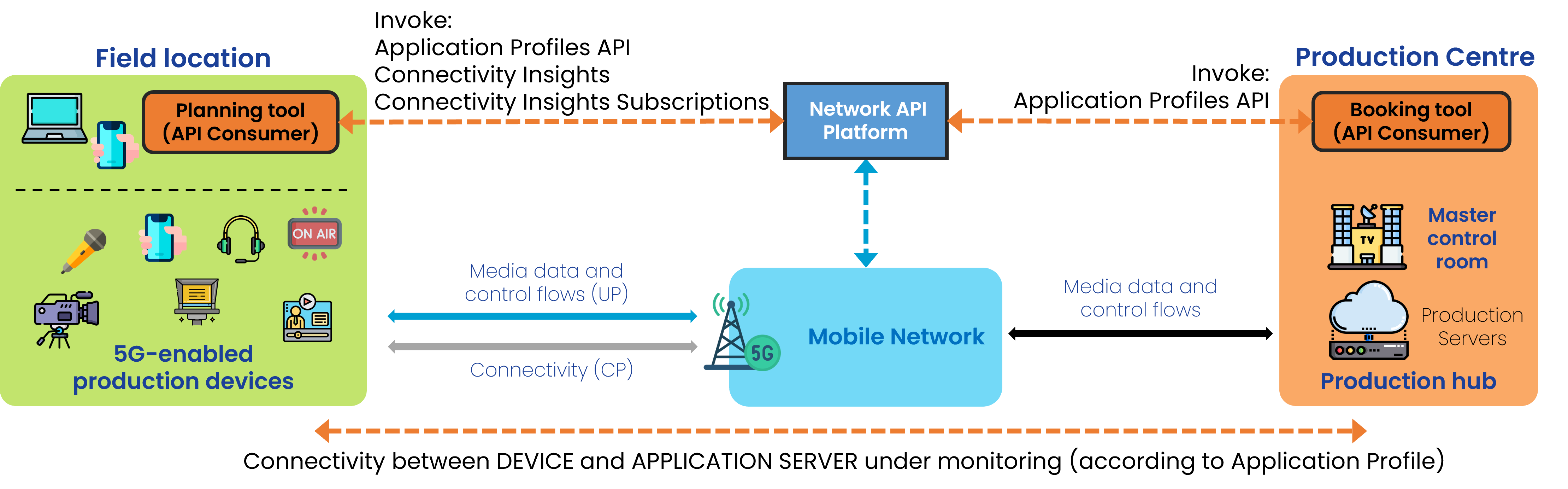
Step 0: Pre-conditions
- Create an application profile using the Application Profiles API (with the relevant application requirements).
- Create a device object for the device which media flow is to be monitored.
- Obtain IP address and port of the application server (Ingest Server of Production).
Step 1: Obtain one-shot information on network quality
- POST /check-network-quality, passing the applicationProfileId obtained in step 0, the address/port of an application server, and a device object.
5G-MAG’s Self-Assessment
The APIs are likely to be invoked to obtain information about the ability of the network to meet the requirements either before or during operation. However:
- The information received is instantaneous. Network status in the future cannot be derived from the response. Information provides no reliability for the actual time in which network should be used.
- The information received is qualitative (e.g.
"targetMinDownstreamRate": "meets the application requirements"). An application would be unable to understand which parameters to be adapted in order to revert a situation in which requirements cannot be met.
Potential improvements:
- If used to monitor resources for which QoS was requested (via a different API) harmonization of Application Profile and QoS Profile for consistency.
- an indication of the actual performance parameters (quantitative) for those defined in the Application Profile may provide better insight for potential remedies. E.g. latency cannot be fullfilled, but please respond with the actual latency the link device-AS is experiencing.
Application Profiles API Usage
Check: Application Profiles API. The type of parameters that an applicationProfile defines includes:
{
  "networkQualityThresholds": {
    "packetDelayBudget": {
      "value": 12,
      "unit": "Minutes"
    },
    "targetMinDownstreamRate": {
      "value": 10,
      "unit": "Bps"
    },
    "targetMinUpstreamRate": {
      "value": 10,
      "unit": "Bps"
    },
    "packetLossErrorRate": 3,
    "jitter": {
      "value": 12,
      "unit": "Minutes"
    }
  },
  "computeResources": {
    "targetMinCPU": 0.5,
    "targetMinMemory": {
      "value": 10,
      "unit": "Kb"
    },
    "gpuVendorType": "Nvidia",
    "gpuModelName": "string",
    "targetMinGPU": 1,
    "targetMinGPUMemory": {
      "value": 10,
      "unit": "Kb"
    },
    "targetMinEphemeralStorage": {
      "value": 10,
      "unit": "Kb"
    },
    "targetMinPersistentStorage": {
      "value": 10,
      "unit": "Kb"
    }
  }
}
Device object
This is how a device is defined:
  "device": {
    "phoneNumber": "123456789",
    "networkAccessIdentifier": "123456789@domain.com",
    "ipv4Address": {
      "publicAddress": "84.125.93.10",
      "publicPort": 59765
    },
Connectivity Insights API Usage
Obtain information about network quality
With POST /check-network-quality passing:
- the ApplicationProfileId,
- the device object
- identifier for the application server (IPv4 and/or IPv6 address and ports)
{
  "applicationProfileId": "3fa85f64-5717-4562-b3fc-2c963f66afa6",
  "device": {
    "phoneNumber": "123456789",
    "networkAccessIdentifier": "123456789@domain.com",
    "ipv4Address": {
      "publicAddress": "84.125.93.10",
      "publicPort": 59765
    },
    "ipv6Address": "2001:db8:85a3:8d3:1319:8a2e:370:7344"
  },
  "applicationServer": {
    "ipv4Address": "192.168.0.1/24",
    "ipv6Address": "2001:db8:85a3:8d3:1319:8a2e:370:7344"
  },
  "applicationServerPorts": {
    "ranges": [
      {
        "from": 5010,
        "to": 5020
      }
    ],
    "ports": [
      5060,
      5070
    ]
  },
  "monitoringTimeStamp": "2023-07-03T12:27:08.312Z"
}
Type of response: The network’s current level of confidence that it can meet an application profile’s quality thresholds for a given end user device.
{
  "packetDelayBudget": "meets the application requirements",
  "targetMinDownstreamRate": "meets the application requirements",
  "targetMinUpstreamRate": "meets the application requirements",
  "packetlossErrorRate": "meets the application requirements",
  "jitter": "meets the application requirements",
  "additionalKPIs": {
    "signalStrength": "excellent",
    "connectivityType": "5G-SA"
  }
}