
This documentation is currently under development and subject to change. It reflects outcomes elaborated by 5G-MAG members. If you are interested in becoming a member of the 5G-MAG and actively participating in shaping this work, please contact the Project Office
CAMARA: QoS Profiles API
Description
The “Quality-of-Service (QoS) Profiles” API provides a set of predefined network performance characteristics, such as latency, throughput, and priority, identified by a unique name. These profiles allow application developers to specify the desired network behavior for their application’s data traffic, ensuring optimal performance. By selecting an appropriate QoS profile, developers can request stable latency (reduced jitter) or throughput for specific data flows between client devices and application servers when used by the Quality On Demand API.
Used in the context of:
- Dedicated Networks API
- Quality on Demand API
- QoS Provisioning API
- QoS Booking API
- QoS Booking and Assignment API
Information: https://camaraproject.org/qos-profiles/ and https://github.com/camaraproject/QualityOnDemand
The API definitions can be obtained here: https://github.com/camaraproject/QualityOnDemand/tree/main/code/API_definitions
Relation of APIs
QoS Profiles API
- POST /retrieve-qos-profiles with a request body including a
deviceobject,nameof the profile andstatus, it is used to query QoS Profiles for a given device. The response contains information about the QoS Profiles - GET /qos-profiles/{name} - get QoS Profile for a given name
Parameters describing a QoS Profile
packetDelayBudget- the maximum allowable one-way latency between the customer’s device and the gateway from the operator’s network to other networks. The end-to-end or round trip latency will be about two times this value plus the latency not controlled by the operatortargetMinDownstreamRate- the target minimum downstream rate.targetMinUpstreamRate- the target minimum upstream ratepacketLossErrorRate- the exponential power of the allowable error loss rate 10^(-N). For 5G network the 3GPP specification TS 23.203 defines the packet error loss rate QCI attribute.jitter- this requirement aims to limit the maximum variation in round-trip packet delay for the 99th percentile of traffic, following ITU Y.1540 standards. It considers only acknowledged packets in a session, which are packets that receive a confirmation of receipt from the recipient (e.g., using TCP).minDurationmaxDurationpriorityl4sQueueType
Workflow: Media application retreiving QoS profiles
A user of a media application would like to retrieve QoS profiles available in the network. An example figure is shown using the QoS Profiles in the context of Quality on Demand. The following steps are executed:
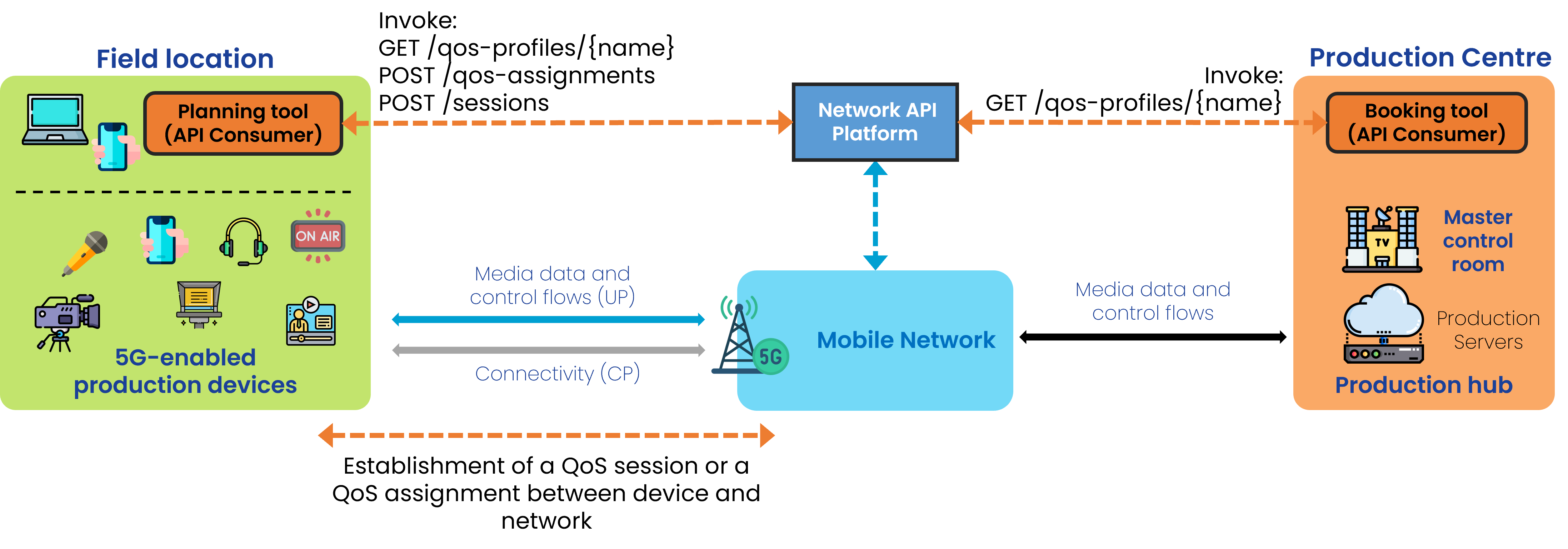
Step 0: Pre-conditions
- The API invoker needs to have signed up with the API provider.
- qosProfiles have already been defined and made available by the network operator.
- Names of such qosProfiles have been disclosed to the user so they can be used when invoking APIs.
Step 1: Check details of an existing QoS Profile (when not cached)
- GET /qos-profiles/{name} to obtain the parameters of the QoS Profile
5G-MAG’s Self-Assessment
The QoS Profiles API would be used prior to the start of the event in order to understand the profiles and details of the profiles available in the network. However, it seems that the only way to obtain the list of parameters of a profile is by invoking the API with the QoS Profile name. There is a method lacking the query of profile names. There is also no method to define QoS Profiles, and this operation should be done beforehand.
Potential improvements:
- A way to list profile names available in the network
- A solution to the fact that QoS Profiles need to be established manually before being able to invoke them.
- There is no information about the location or service area where such profiles are available. It would be inpractical if QoS Profiles would only be retrievable once in the exact location and at a given time.
Quality-of-Service (QoS) Profiles API Usage
Obtain QoS profiles available
With POST /retreive-qos-profiles, and device parameters.
{
  "device": {
    "phoneNumber": "+123456789",
    "networkAccessIdentifier": "123456789@domain.com",
    "ipv4Address": {
      "publicAddress": "203.0.113.0",
      "publicPort": 59765
    },
    "ipv6Address": "2001:db8:85a3:8d3:1319:8a2e:370:7344"
  },
  "name": "voice",
  "status": "ACTIVE"
}
Type of response: information about the QoS Profiles
[
  {
    "name": "voice",
    "description": "QoS profile for video streaming",
    "status": "ACTIVE",
    "targetMinUpstreamRate": {
      "value": 10,
      "unit": "bps"
    },
    "maxUpstreamRate": {
      "value": 10,
      "unit": "bps"
    },
    "maxUpstreamBurstRate": {
      "value": 10,
      "unit": "bps"
    },
    "targetMinDownstreamRate": {
      "value": 10,
      "unit": "bps"
    },
    "maxDownstreamRate": {
      "value": 10,
      "unit": "bps"
    },
    "maxDownstreamBurstRate": {
      "value": 10,
      "unit": "bps"
    },
    "minDuration": {
      "value": 12,
      "unit": "Days"
    },
    "maxDuration": {
      "value": 12,
      "unit": "Days"
    },
    "priority": 20,
    "packetDelayBudget": {
      "value": 12,
      "unit": "Days"
    },
    "jitter": {
      "value": 12,
      "unit": "Days"
    },
    "packetErrorLossRate": 3,
    "l4sQueueType": "non-l4s-queue",
    "serviceClass": "real_time_interactive"
  }
]